Q: Why should I use nofollow tags?
A: Use the nofollow tag to tell Google that the linked page is one that you don't endorse and don't want to be associated with your site. But you just linked to because the linked content somehow improves your users' experience.
Q: Does clicking links in Google Search affect a website's authority or ranking?
A: Two things that can negatively affect a website's authority or ranking are (1) low clickthrough rate (many more impressions than clicks) and (2) high bounce rate (large proportion of users reaching a landing page immediately click away off the site).
Q: How can we find and hire an SEO specialist or company to improve our website's search engine rankings?
A: Ask local business owners you know and trust if they're using an SEO consultant to whom they would be comfortable referring you. If no results from that, try doing a Google search for “seo consultant near me” - but be aware that the majority of SEOs that come up in that search will likely NOT be near you at all, but rather will be big full-service digital marketing companies in NYC or LA or elsewhere.
Q: How can you determine your Google search rank and does it fluctuate over time?
A: There is no “absolute” Google organic search rank for any web domain or URL. Results of each individual user query are colored by that user's search history and location, and the phrasing of the query. And yes, all else being equal, results will vary over time because of the aging of your content and the actions of competitors.
Q: Is page speed or mobile friendliness more important for ranking in Google?
A: Page speed is inherent in mobile-friendliness, so the 2 are inseparable. But because in July Google stopped indexing pages that can't be crawled by the mobile Googlebot agent, mobile-friendliness (whatever that is, exactly) is essential.
Q: How do I get Google ranking info for all pages of my site?
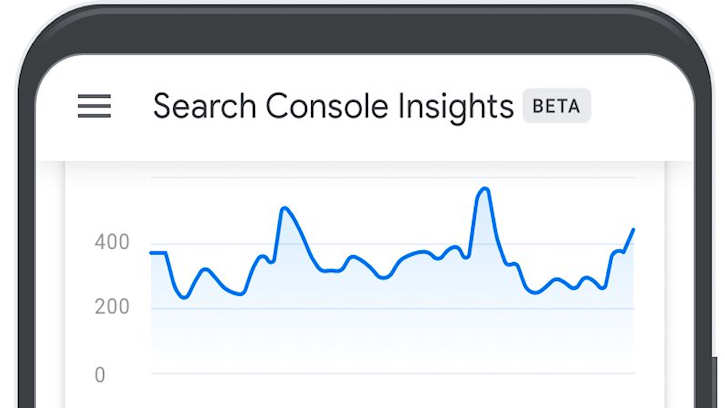
A: Google Search Console can show you for various time spans (last 7 days, all time, etc.) for each page its average position in SERPs. In the Performance report, turn on Average Position data (click on this above the graph) and click on Pages below the graph. Report will give you impressions, clicks and average position for each page with non-zero impressions.
Q: What are the steps in making my robots.txt crawlable?
A: For robots.txt to be useful in helping search engines find their way around your site, really all you have to do is put it at the root of your web server - where the default page is, the page that opens in browsers at “mydomain(dot)com”.
For robots.txt then to work as intended, in the simplest case add these lines of code:
Sitemap: https://www.mydomain(dot)com/sitemap.xml
User-agent: *
Disallow:
The “sitemap” line of code tells search engines where your xml sitemap is. You need to create this - there are free and paid online tools - and upload it to the server root.
The user-agent line says your robots.txt file applies to all crawlers (using the * wildcard).
The disallow line - with nothing after the colon - means “disallow none” - that is, no crawlers are disallowed.
Be sure to substitute your own domain for “mydomain”.
Q: How do I choose the best keywords for my geographical area since Search Console, Google Maps, and Wix all say different things?
A: It's difficult to get good local keyword data from any of the keyword tools, especially for a relatively small area. Texas might be doable, Rhode Island probably not. But even if you make every effort to hide your location from Google - incognito browser, etc. - Google still knows where you are. So the highest-ranking Google organic search returns - and top sponsored listings - for your type of business (with no geographic modifier) will usually produce what Google thinks are the most relevant local pages. You can then find out from the TITLE, META DESCRIPTION and H1 tags on these pages the keywords for which they've been optimized. And you can use one of the free online word-counting tools on the full text of these pages as well, to see what words/phrases appear most often.
Q: Why does an answer rank high on Google Search results but not show up when searching directly on the site?
A: I'm going to assume that by “searching directly” you mean via a search function that's installed on the site. If that's the case, the likely reason is that Google has a very much larger database of search history than does the onsite search function, and that users doing a similar query don't bounce from that page when sent there by Google.
Q: What is the process for checking the ranking of a website on Google compared to other websites with similar content?
A: Rankings are associated with queries, or “keywords.” You could just do a Google search on your query of interest and scroll through the results until you find that website. But that ranking is specific to you, because Google knows your physical location and search history. I get estimates of the “universal” relative ranking of websites/URLs for specific queries by using the SEMRUSH keyword tool - which is not free but is better than others I've tried. (I don't get commissions from SEMRUSH.)
Q: Can creating too many links at once result in a penalty from Google for our site?
A: If you mean backlinks: yes, because it will look to Google like you have bought these links - especially if they are of low quality or not relevant to your content.
Q: Google webmaster is not indexing my pages at all, and not even crawling, I don't have any penalty and I have only low competition keywords, I have more than 1k pages, it is been 20 days after I submit my sitemap?
A: I get 403 (forbidden) error from the URL of your home page. That probably means your web server is not configured correctly, or some necessary permission is lacking. Contact your hosting company.
Q: What is the significance of an XML sitemap for SEO? How can one create an error-free XML sitemap for submission to Google Webmaster Tools and Bing Webmaster Tools?
A: A good XML sitemap helps search engine agents crawl and index the important pages of your website quickly and accurately. Using a Google search, you should be able to find numerous free and paid XML sitemap creation tools online. Learn to use the various settings these kinds of tools offer, particularly the one that excludes unimportant pages.
Q: What is the meaning of the average position in the Google search console?
A: In Search Console reports, “average position” makes the most sense if you view it in the context of Performance/Queries or Performance/Pages. Those reports will show you, respectively:
For a specific user query, the average position in which an impression of one of your pages was made available; or
For a specific page, the average position in which an impression of that page was made available.
In either case, impressions are averaged over whatever timespan you've specified.
Q: How does Google determine the text to display as the "meta description" for a website in search engine results pages (SERP)?
A: In organic search returns, Google will usually display the first 150 or so characters of the META DESCRIPTION tag you have put on the page - unless it looks to them like that doesn't accurately represent the content of the page, in which case they might use the H1 tag or part of the first sentence of copy, or something else altogether. So write good META DESCRIPTION tags to avoid your search returns being created by someone at Google.
Q: Is it true that Google no longer considers meta keywords? If this is the case, why do some people still include them when they do not impact search engine rankings?
A: Although some other search engines may consider the META KEYWORDS tag, Google has not since 2009. But in my opinion the main reason not to use this tag is that it reveals to competitors the keywords for which you're trying to optimize pages.
Q: What is the recommended frequency for checking for broken links on a website to avoid SEO penalties from Google?
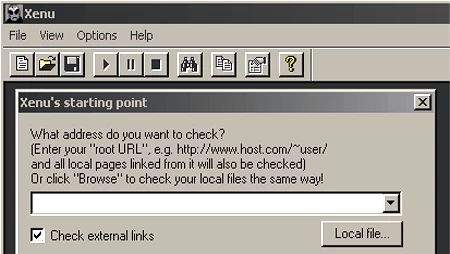
A: An occasional broken link won't bother Google all that much. But link checking is fast and easy with a free tool like Xenu Link Sleuth (search on that) so we check at least once a week.
Q: If content is not available on the homepage, can it affect ranking?
A: If you mean that home page has no content at all - the ultimate form of “thin content” - yes, that will adversely affect Google ranking. Google wants pages to have content that's of value to users. No content = no value.
Q: How do header tags (H1-H6) affect SEO?
A: Done correctly, H1 (etc.) tags help Google understand what your pages are about, and what copy in them is most important. Anything that can do that is advantageous SEO-wise.
Q: What happens if a webpage does not have a title tag or meta description? Will Google still show a description in the search results?
A: Yes, if it crawls and indexes the page at all, Google will create a description using the H1 tag, the first several words of text, or whatever else it may be able to find in the page. Always provide a TITLE and DESCRIPTION so that you have some control over the clicks your search result will draw.
Q: Does using HTTPS instead of HTTP on a website improve its SEO ranking on search engines like Google? If so, to what extent does it impact the ranking?
A: Google has been saying since at least September 2022 that it is aiming for 100% encryption of web pages and that accordingly, its “page experience signals” - used in ranking - include serving pages by HTTPS. So yes, in general you should expect HTTPS pages to rank somewhat better than HTTP pages - but it's difficult to isolate the impact of this one factor. Because it's easier to make pages HTTPS that it is to measure the effect: just do it.
Q: How important do you think on-page optimization is for a website to rank in Google?
A: The trick to doing on-page optimization and getting results at Google is to know which changes that you could make will move the needle ranking-wise, and concentrating on those.
Q: What is the process for changing the name of a website without affecting the domain name or SEO rankings?
A: I understand you to mean that you will be keeping the existing domain name (like “bobs.com”) but changing the TITLE and some other tags on the home page - and elsewhere - from “Bob's Store” to “Bob's Place” or something like that. Is that correct? If so, zero loss of organic search rank is going to be difficult to achieve while at the same time optimizing pages for the new site name. If page filenames and paths (URLs) will be changing, you can take care of that with redirects. But changes to content will affect rankings, and you can't fix that with redirects. Could you accomplish what you're trying to do with a subdomain or subdirectory? That would make maintaining rankings a lot easier.
Q: Can you explain the process of creating redirects for old URLs to new ones using Google Webmaster Tools?
A: Creating redirects should be done at your web server. Google Search Console (ex-Webmaster Tools) has a “Change of Address” tool but that only works for redirecting one domain or subdomain to another.
Q: How do I optimize my website's images to improve search engine rankings?
A: Based on a review of your site: Use modern file formats like webp that have much smaller file sizes so load faster. Use descriptive file names. Use descriptive ALTs. Put image dimensions in IMG tags so pages render faster. Place images in pages near related text so images have synergies with the rest of your content, for potentially better ranking. Make images links to further information. Avoid stock images wherever possible.
Q: How do I fix my website showing up high on Google but no clicks or sales for a seasonal winter product?
A: If your only product is something like ice skates or down jackets, you should expect demand to be very seasonal. Ski areas are attempting to raise off-season demand by introducing a related summer seasonal product: mountain biking. Is there a summer product that's a logical fit with your winter product - rollerblades, rain jackets?
Q: Is Google still the only Search Engine that matters when it comes to SEO?
A: Yes. With 90+% share of all searches in both North America and Europe, and with its ranking algorithm changing on a daily basis, Google is the only search engine worth spending time optimizing for. And as a by-product, any optimization done for Google also works well for any other general search engine.
Q: Can Google ban a website from ever showing on their search engine?
A: Yes. Most famously, in 2006 Google banned BMW Deutschland for cloaking. The site showed Google a keyword-stuffed page of text, while showing users photo car ads.
Q: Is Google search engine still upgrading?
A: Yes, on a daily, hourly or minute-by-minute basis.
Q: Does Google penalize sites that use more than one H1 tag per page for SEO?
A: No - but if you have multiple H1's the fix is easy, why take chances?
Q: How does Google determine a website has new content and thereby update search results?
A: You can influence this by referring in your robots.txt file to an XML sitemap in which you have specified an update frequency (daily, weekly, etc.) telling Google how often your site changes. Absent that, google will by trial and error establish a re-crawl frequency for your site. What Google finds on the latest crawl replaces earlier data. Search results will reflect the most recent crawl, but not necessarily instantaneously.
Q: What do you do if your content doesn't get crawled regularly by Google?
A: Start with the basics: create an XML sitemap that specifies your change frequency, link to the sitemap from your robots.txt file, take ownership of your site in Search Console and submit your sitemap for crawling.
Q: Does Google index mobile versions of a website in addition to standard format websites?
A: Short answer is “yes” but there's more to it than that. Currently, Google's primary crawler for indexing is the smartphone version of the Googlebot user agent. Since 1 July 2019, NEW sites are crawled ONLY with the smartphone user agent. Older sites that don't index easily using the smartphone version of Googlebot may continue to be crawled for some period of time with the desktop Googlebot. But the handwriting is on the wall: your site needs to be smartphone-Googlebot-friendly - right now.
Q: To effectively track my website with Google analytics, do I have to add their script on every pages that I create or can I just leave it on the index page only?
A: GA code must be on every page on which you want GA data. A relatively easy way to accomplish that is to find some piece of HTML code that appears consistently in the HEAD section of every page and use an HTML editor with search/replace function to replace globally that existing line of code with [the same line of code] + [your GA code].
Q: Would submitting my websites to directories help Google ranking?
A: Being listed in high-quality directories should help get you valuable traffic. Best bets are usually directories of local businesses, and industry-specific directories. Worst bets are directories that will list anyone in the world for money, or for reciprocal links. Example: A company calling itself “The Ultimate Directory Submission Service” (search for it on Google) will list you on “the top 491 free directories” for $0.20 a pop. Don't waste you time and money on deals like that.
Q: If I'm someone who wants to rank his blogs at will, will it be possible for me to achieve that if I know all 250 or more factors that Google search codes are about?
A: Along with knowing what all the ranking factors are, you'd have to be able to CONTROL them unilaterally from your end in order to rank your blogs “at will” - and that's going to be difficult because of (1) off-page factors that you can't control (like the actions of competitors) and (2) Google's ongoing (secret) tweaks to their ranking algorithm.
Q: How do you make your Google mobile search results more clickable?
A: Run Google's Mobile Friendliness Test on your home page. Google will tell you what needs fixing and how to do it. Implement all the recommendations and when Google is happy with your home page, repeat for your other important pages. Repeat until you get all the clicks you want.
Q: How do I get more visitors from Google for free to my local business website?
A: Create the best possible Google Business Profile, and keep it updated. Google is constantly adding features to its products, and GBP is no exception. Post photos. Encourage customers to leave reviews. Make sure your map pin is located correctly. Monitor GBP insights and improve your listing accordingly. On your website, cover all the SEO basics: TITLE and Description tags, no broken links, mobile friendliness, fast page loading. Doing all those things will, over time, attract high-quality links, which Google likes. Don't buy or exchange links, which Google DOESN'T like.
Q: Is there any public information available on how Google's algorithms work?
A: Speculation yes, “information” no - at least none that I would trust.
Q: How does Google generate the short descriptions below searches?
A: Usually from the META Description tag in the code at the head of the page.
Example:
If a site has a META Description tag like ‘Expert digital tourism advertising and marketing | Boston and Maine - customized research based campaigns’
Google will likely use part or all of ‘Expert digital tourism advertising and marketing | Boston and Maine - customized research based campaigns’ in the SERP.
If the page has no META Description tag (bad idea) or one that Google doesn't think is descriptive of the content, Google will pick/choose from available content - maybe the H1 tag or something in B tags.
Q: How many times does Google Spider need to visit a new page before it decides to rank it in the results?
A: Remember there's a distinction between indexing and ranking. The Googlebot is a dumb creature, just finds what's there and reports back. Ranking happens on a search-by-search basis. An unindexed page won't ever appear in a Google SERP, but the fact of indexing doesn't guarantee anything in the way of ranking.
Q: In the Google Search Console, what is the difference between an error and valid with warnings for schema markup? Also, does a warning prevent the content from being indexed?
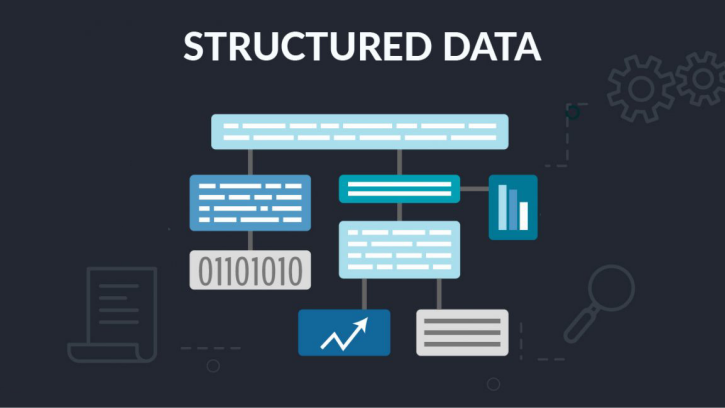
A: Basic difference is that a structured-data warning should affect neither indexing nor ranking - not necessarily true of errors.
Q: Does Google consider no-follow links for search rankings?
A: Google has stopped ignoring nofollow links altogether, and now considers “nofollow” to be a clue as to the value of the link. Also Google now encourages the addition of “sponsored” or “ugc” attributes to nofollow links to make it easier for AI to understand the reason for the nofollow. Short answer: sometimes (maybe).
Q: Can you trust someone who claims the ability to predict Google ranking algorithms?
A: No, absolutely not. Anyone with the ability to do that would have too much money to be spending time trying to sell you SEO or whatever.
Q: Have the recent Google updates put sites that sell links out of business or are there still naive people who purchase them?
A: Unfortunately, Google has been slack in penalizing the use of paid backlinks. By doing a Google search on “buy links” you can see that the link-selling industry continues to be alive and well. Right now from that search, on Page 1 I'm seeing 7 paid Google Ads selling links along with a full slate of organic listings.
Q: What is Google optimization?
A: If your question is of a general nature - like “how do I optimize for Google search”: you begin by studying Google's policies and recommendations - all fully laid out in great detail at Google - then learn to use the various Google tools like Keyword Planner, PageSpeed Insights and Lighthouse. Create and test your website using those tools, follow all Google's recommendations for improvement. Repeat until you have the customers, leads and sales you want. Or, alternatively, hire a Google search pro to do the optimizing - faster immediately, and cheaper in the long run.
Q: Which backlinks do more harm than good to a website's search engine rankings?
A: Backlinks you pay for. Backlinks with reciprocal linking. Links from sites with content unrelated to yours.
Q: There are some pages that I have deleted from my website, but are still showing up in Google search. What will be better for seo, remove the page or redirect the page?
A: A 301 (permanent) redirect will be instant-on and will prevent links from Google and whoever else may be linking to that page from going to 404 "File Not Found" page (always a bad user experience). Then at your leisure you can find any existing links from external sites and ask webmasters to switch to a relevant existing URL.
Q: What is the least expensive Google keyword?
A: The least expensive keywords are those that never match a search query. Avoid.
Q: Do SEO companies really help? Is it worth it?
A: SEO done well helps most businesses that are selling something for which people search online (and there are few exceptions to that today). But not all SEO companies are created equal. Avoid any that promise specific results like “page 1 of Google in 30 days” etc. - if you get an offer like that, ask ’page 1 on what keywords?” and be prepared for waffling. Extensive experience and specialization in your industry or a related group of industries are both useful qualifications for a company doing SEO. Also, to do SEO well requires a certain minimum threshold of up-front spend that's pretty much independent of the size of the client's business. So the minimum investment in effective SEO for a 3-room B&B might be about the same as that for a 100-room hotel, so may be out of reach for the smaller business. Google Ads is a useful alternative in that situation.
Q: What can SEO services do that WordPress plugins like Yoast can't?
A: Yoast is OK for basic on-page optimization but it doesn't know what's going on in your competitive space. And anyone doing SEO professionally will find that out, track, and adjust optimization accordingly.
Q: What do we need to set up Google Analytics on our site?
A: You need a Google account from which to create a Google Analytics tag, FTP (or otherwise) access to the website so you can download/upload HTML files, an HTML editor or other means to put the GA tags onto the pages.
Q: Should we look beyond Google for our SEO strategy and optimize for other search engines?
A: I once for several months tried optimizing for Bing alongside optimizations for Google, and found (1) it was a distraction, Google was enough to deal with without Bing, and (2) pages optimized for Google performed, on average, as well or better than those optimized for Bing. So once again, I optimize for Google only - which after all has 90%+ search share across the Western world vs. around 3% for Bing.



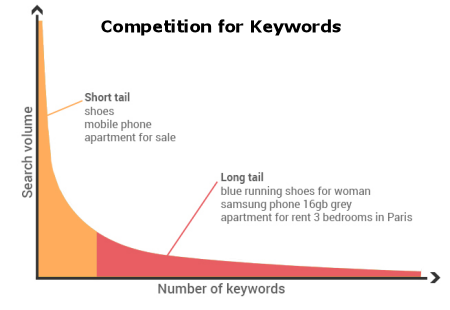 For businesses without unlimited advertising budgets - like mine, maybe yours - the key strategy is to attract queries that are (1) more specific to your business so have less competition and (2) signal purchase intent, so your traffic comes from people looking to buy what you're selling.

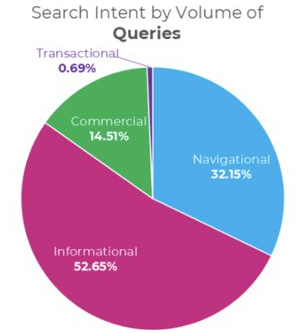
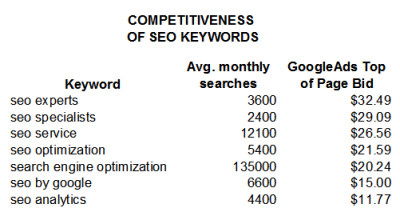 Cost of a Google Ads click is a good metric for competitiveness of keywords. In the table to the left, see how although "seo experts" and "seo analytics" both are getting around 4,000 searches a month, more competition on "seo experts" makes a click on that cost nearly 3X that of a click on "seo analytics". Reason for this is almost certainly that users looking for "seo experts" convert to SEO buyers at around 3X the rate of users looking for "seo analytics."
 Ready to start making more money now? Most SEO campaigns need an investment of only a few hundred to a few thousand dollars a month, unconditionally guaranteed to satisfy you. Find out how my professional, affordable SEO services can help you get more customers and make more money from your website. Go here to schedule a


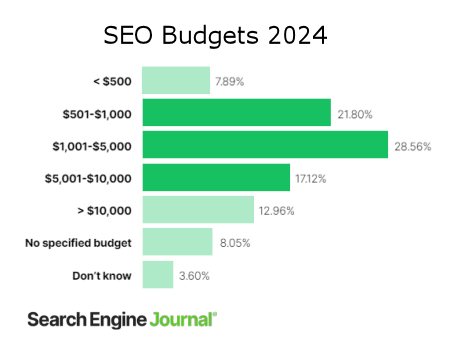 Results of a recent survey published by

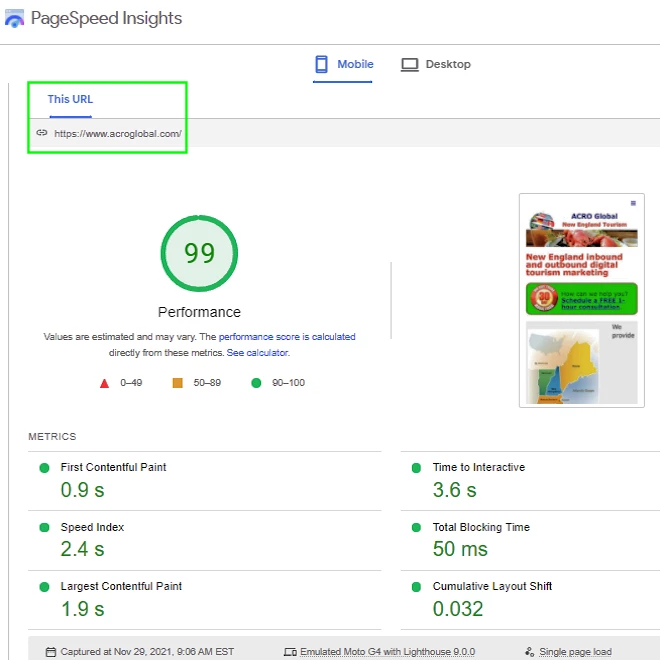

 Google Page Experience Ranking now applies to desktop as well as mobile


 Ready to start making more money now? Most Google Search Engine Optimization campaigns need an investment of a few hundred to a few thousand dollars a month, unconditionally guaranteed to satisfy you. Go here to tell me a bit about your business objectives and